

BOS Setup companion
What's inside BOS Setup
A closer look at what BOS Setup includes and how the modules work together—from intake and estimates through field work and visibility.
Modules by operating flow
How the pieces work together
Use this map to jump into a module. It follows the same operating flow—not a catalog of disconnected tools.
Intake
Inspection / Estimate Prep
Estimate / Close
Project
Field / Completion
Visibility / Control
Across the System










Module details
Open a module to see what it does and how it fits the operating flow.
Every client, contact, and follow-up in one place.
Keep client profiles, contacts, service locations, follow-ups, and communication history together.
Best for
Owners · Office Managers · Intake Teams · Sales Staff
Result
Every client relationship, service location, and open follow-up stays organized from first contact forward.
BOS screen preview
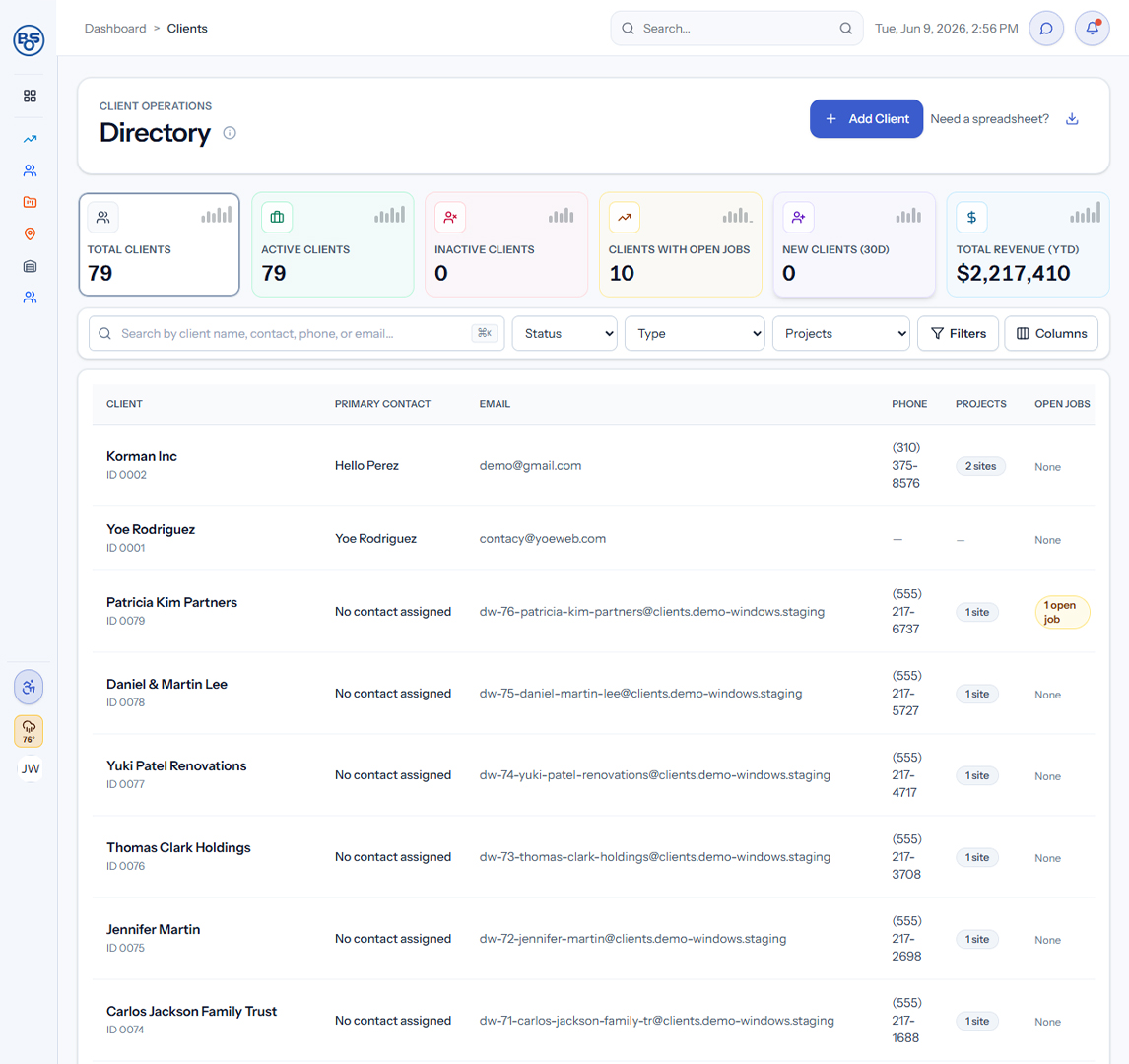
Every client, contact, and follow-up in one place.
Keep client profiles, contacts, service locations, follow-ups, and communication history together.
Best for
Owners · Office Managers · Intake Teams · Sales Staff
Result
Every client relationship, service location, and open follow-up stays organized from first contact forward.
BOS screen preview
BOS Setup is configured and implemented with Yoeweb around the business's actual workflows.
See how these modules would fit your operation.
A strategy session is the next step if you want to look at this around your actual workflows.